The AI agent onion: what happens when an agent reads your website
Follow a single request from prompt to page and the layers of an AI agent reveal themselves - including the one that quietly decides whether your site exists at all.
On this page
Ask a simple question: when an AI agent answers a query using your website, how does it actually fetch and read your page?
Most people picture one thing. "The AI" reaches out, browses the web like a person, looks at your page, and comes back with an answer. One actor, one action.
But an agent does not browse like a person. When you visit a site, one actor does everything: your browser finds the page, requests it, runs its scripts, paints the result, and your eyes read what appears. An agent splits that single act across several layers, and each one is a different piece of software doing a different job. Think of it like an onion. The user's question is on the outside, your website is at the very center, and in between sit the layers the request passes through on its way in and back out.
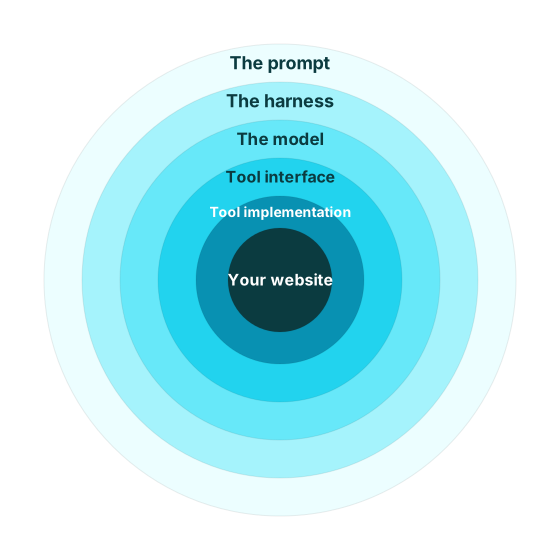
Those layers matter because the thing that finally arrives at your website is nothing like a browser. It is a bare request from deep inside the onion, and what it can see of your page is narrower than you would expect.
So let's peel the onion. We'll follow one request from a typed prompt all the way down to your server, and the layers will reveal themselves as we go. The last one is the one to remember.
The layers, named#
Before we trace a request, here's the whole onion at a glance, outermost to innermost:
- The prompt: the user's intent enters the system.
- The harness: the orchestration layer that runs the loop, assembles context, and executes actions. (Sometimes called the agent framework, gateway, or runtime.)
- The model: the LLM that predicts text and decides to act, but never touches the network.
- The tool interface: the contract that tells the model what actions exist and how to call them.
- The tool implementation: the harness code that actually opens a network connection.
- The network and your website: where the request finally lands.
Everything below is that list turned into a story. One request, top to bottom.
Peeling the layers: one request, traced#
The prompt and the decision to act#
A request starts with the model receiving its context window (the system prompt, the list of tools it's allowed to use, any memory, and the user's message) and doing what LLMs do: predicting the next tokens.
There is no separate "should I look this up?" module. The decision to fetch a page is just the model finding that the most likely continuation of the conversation is a request to call a tool, rather than a sentence of prose. A few things tip it that way:
- Tool availability. If no web tool is described in its context, the model literally cannot choose one. It can only reach for actions it's been told exist.
- Recency and specificity cues. Words like "latest" or "current," a date beyond its training cutoff, or a pasted URL all nudge the model toward acting instead of answering from memory.
- Confidence. If the answer is already derivable from context or training, the model just writes it. Uncertainty about a live fact is what pushes it to reach outward.
The important thing: this is a prediction, not a hardcoded rule. Deciding to fetch is a judgment the model makes, and like any judgment it can be wrong in both directions.
The model hands off, and stops#
When the model decides to act, what it actually produces is small and structured:
{
  "name": "web_fetch",
  "input": { "url": "https://example.com/pricing" }
}
That's the model's entire contribution: a tool name and some parameters. It picks which tool and fills in the arguments, then hands that off and waits.
The model never touches a socket
The model does not open connections, send HTTP headers, or receive bytes from your server. It emits a structured request describing what it wants done, and everything network-related happens on the other side of that handoff, out of the model's sight. This is the single most useful thing to internalize about how an agent reaches your site.
Which tool the model can even choose is worth a beat. It isn't reaching for "a search engine" or "a browser" as abstract capabilities. It's choosing from a specific menu the harness gave it. Usually that menu includes something like a search tool (turn a query into a list of candidate URLs) and a fetch tool (retrieve one known URL and extract its readable text). If you paste a link, the model tends to skip search and go straight to fetch. If it needs to discover pages first, it searches, reads the titles and snippets that come back, and then fetches the ones that look promising.
The harness makes the actual request#
Now the harness takes that little { name, input } object and does the real work.
This is the layer that opens a socket to your server, and it fills in everything the model never specified:
- The HTTP request itself: method, the real headers, timeouts, redirect handling, retries.
- Authentication for any provider APIs involved (a search provider, for instance), pulled from a secret store the model has no access to.
- Response handling: taking the raw bytes your server returns and extracting readable text from the HTML to hand back to the model.
Two details of that request matter enormously for whether your site is legible, and they're easy to miss because they're nothing like how a person browses.
An agent fetch is not a browser visit
Two differences do most of the damage.
First, the request usually carries an agent User-Agent (something like Claude-User), not a mainstream browser's, so anything that treats non-browser clients differently treats the agent differently.
Second, and bigger: a plain fetch does not execute JavaScript.
It takes the HTML your server sends and stops there.
No client-side rendering, no hydration, no scripts firing to fill in content after load.
That second point is the hinge of the whole story, so let's turn to what the agent actually gets back.
What comes back#
The harness fetches your URL and gets an HTTP response. From here there are, roughly, two futures.
The good one. Your server returns clean, meaningful HTML with the actual content already in it (headings, paragraphs, prices, whatever the page is about), rendered server-side and present in the raw markup. The harness extracts that text, hands it to the model, and the model can finally read your page and reason about it. This is the path you want every agent to take.
The bad one.
Your server returns a 200 OK, but the body is effectively empty: a shell of <div id="root"></div> and a bundle of JavaScript that would render the content in a real browser (client side).
Or it returns a login wall, or a "soft 404": a page that says "not found" to a human but sends a 200 OK status and a generic body to a machine.
The harness extracts... almost nothing.
Some navigation boilerplate, maybe.
The model receives noise.
Which future you land in depends on how your website is built. Here is the concerning part. When the model gets that noise, it doesn't file a bug or flag your site. It just moves on to the next result in the list. Your page had its one shot at being read, and it returned an empty room.
The payoff: your site isn't ranked lower, it's absent#
There's a strong instinct, inherited from a decade of SEO, to think of this as a ranking problem: an agent-unfriendly site scores lower and shows up further down. That instinct is wrong, and the correction is the most important idea we're discussing here.
There are two separate gates, and they happen in order:
- Readiness: can the agent get to your page and parse its content at all?
- Relevance: does that content actually answer the question?
Readiness comes first. And it isn't a dial that turns your relevance down. It's a gate that decides whether the relevance question ever gets asked.
query
  │
  ▼
search → a list of candidate URLs
  │
  ▼
fetch a candidate  ◄─ READINESS gate
  │
  ├─ unreadable (JS shell, login wall, soft-404)
  │     └─► the page is noise; it silently drops out.
  │         Relevance is never evaluated.
  │
  └─ readable (clean, server-rendered HTML)
        └─► NOW the model judges relevance against the query.
A perfectly relevant page, the best possible answer to the user's question, that fails the readiness gate isn't ranked poorly. It's silent. The model reads an empty response and moves on, and the relevance judgment you were counting on never runs, because there was nothing to judge.
Your site can rank beautifully in Google (which runs a full browser, executes your JavaScript, and waits for the page to paint) and be completely invisible to an agent doing a plain fetch that does none of those things. The two are looking at different versions of your page.
Why we care about this layer#
If you followed the request all the way down, you saw that "an AI reading your website" is really six layers, and your site only ever meets the innermost one: a plain HTTP fetch. If this fetch doesn't return anything meaningful it is silently dropped.
That fetch-and-read boundary is a real, specific, measurable layer which can impact how agents find, read, and interact with your website.
At Aandeg we're building Agent Assay, a tool that allows you to understand how agents interact with your website, where current failure points are, and how you can address them. It requests your website the way an agent's harness does (agent User-Agent, no JavaScript execution, checking soft-404s and the rest) and reports whether the raw response is something an agent could actually use. Not whether it looks good in a browser.